
Guides
Invoices
An invoice is a numbered bill to one customer with a due date. Your customer gets its page, with a Pay invoice button, and the invoice as a PDF, and pays it like any other order. Orrerie does not email customers yet: you send the link or the PDF from your own email.
How an invoice works
An invoice has an id that starts with inv_ and goes through four states:
status | What it means |
|---|---|
draft | You can change anything. It has no number, no order and no page yet. |
open | Finalized. The number is assigned, its one order exists, and its page at https:// works. The dashboard calls this "Awaiting payment". |
paid | Its order was paid. |
void | Cancelled. Its page says so, and its order can no longer be paid. |
overdue is a flag on an open invoice that is past its due date, not a state of its own. Finalizing creates exactly one order, and paying that order pays the invoice. The order stays payable until 30 days after the due date. Numbers are INV- and a counter of your own, never reused.
Orrerie works out no tax
tax_amount is a figure you type, with a label of your own such as "VAT 20%". Orrerie adds what you enter. What tax you owe is a question for your accountant.
Send an invoice from the dashboard
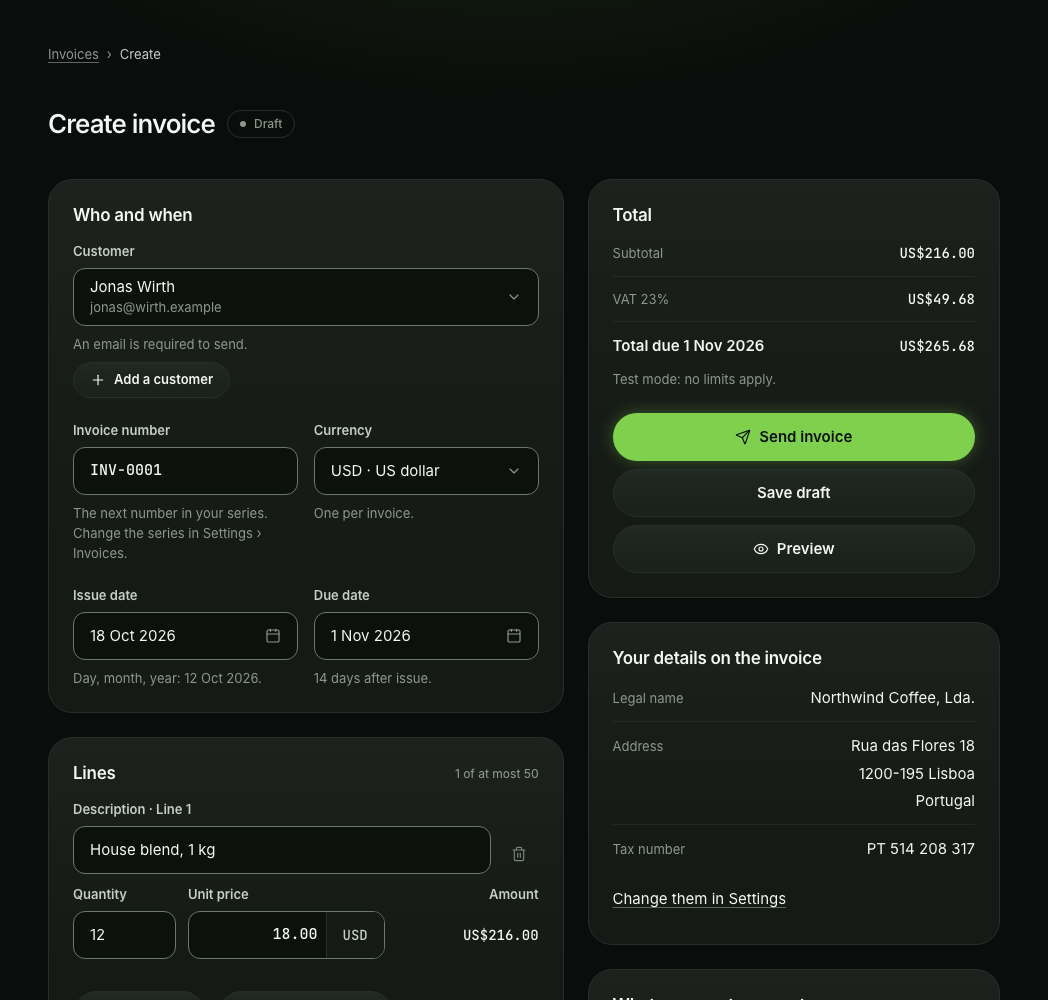
- Open InvoicesIn the left rail choose Invoices, then Create invoice.
- Choose the customerPick a customer or add one. An email address is needed to send.
- Add the linesEach line is a description or a product, a quantity and a unit price. Add a discount, a tax line and a note to the customer if you need them. The total is worked out as you type.
- Check the datesThe issue date is today and the due date 14 days later, unless you change them.
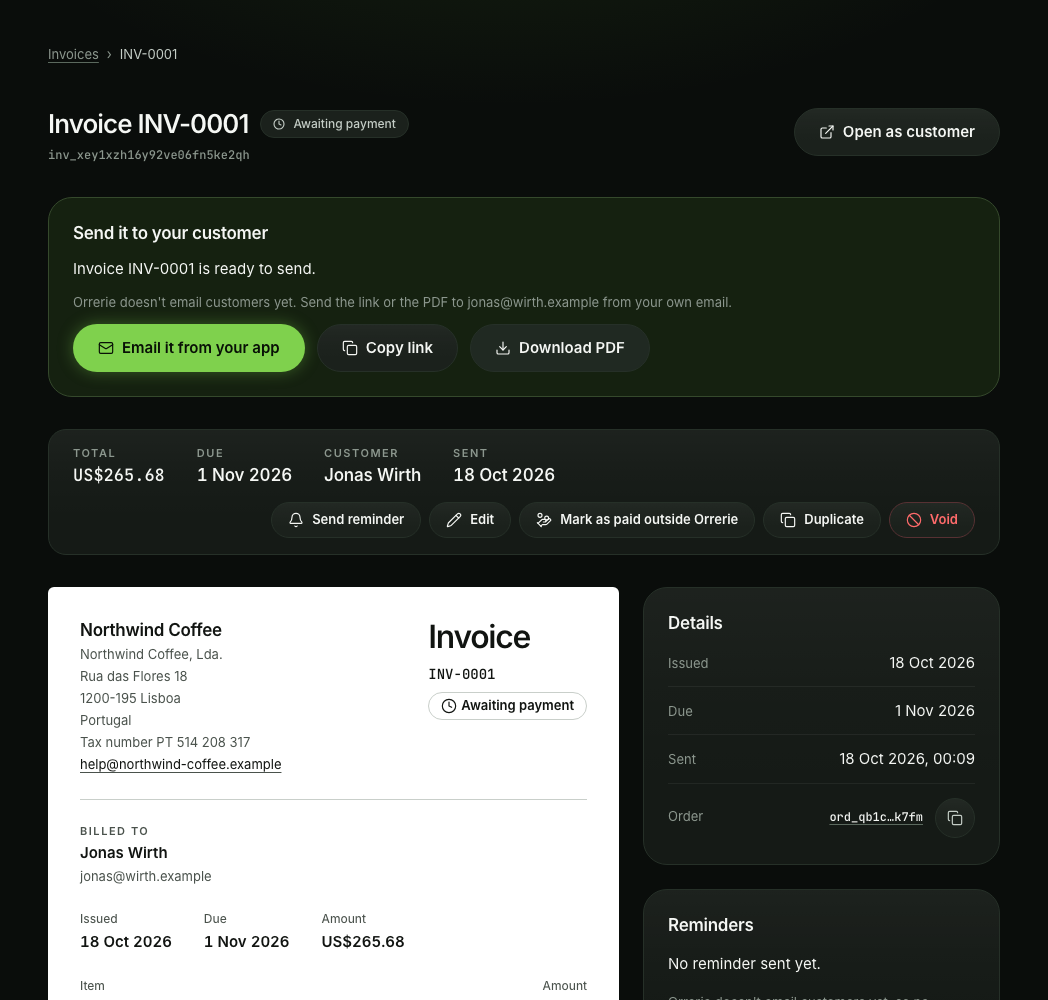
- Preview, then press Send invoiceThe invoice takes the next number in your series and its page opens for payment. Orrerie does not email customers yet, so the dashboard hands you the invoice's link, its PDF and a message to send from your own email: Copy link, Download PDF and Email it from your app.
Save draft keeps it for later. Your legal name, address and tax number on the invoice come from Settings, under the business profile. An Owner, an Admin or a Finance member can send, edit and void invoices.
Send an invoice with the API
Two calls: create the draft, then finalize it. The customer must exist and have an email address.
curl
curl https://api.orrerie.com/v1/invoices \
  -H "Authorization: Bearer $ORRERIE_SECRET_KEY" \
  -H "Idempotency-Key: 8f14e45f-ceea-467f-a9d2-6f1c2b3d4e5a" \
  -H "Content-Type: application/json" \
  -d '{
  "customer": "cus_8ea07c40qsvv19f7rgmeb8ha",
  "currency": "USD",
  "due_date": "2026-10-22",
  "line_items": [
    {
      "name": "Wholesale beans, 20 kg",
      "unit_amount": "17.50",
      "quantity": 20
    }
  ],
  "memo": "Thank you for your order.",
  "footer": "Acme Coffee Roasters LLC"
}'
JavaScript
const response = await fetch("https://api.orrerie.com/v1/invoices", {
  method: "POST",
  headers: {
    Authorization: `Bearer ${process.env.ORRERIE_SECRET_KEY}`,
    "Idempotency-Key": "8f14e45f-ceea-467f-a9d2-6f1c2b3d4e5a",
    "Content-Type": "application/json",
  },
  body: JSON.stringify({
    "customer": "cus_8ea07c40qsvv19f7rgmeb8ha",
    "currency": "USD",
    "due_date": "2026-10-22",
    "line_items": [
      {
        "name": "Wholesale beans, 20 kg",
        "unit_amount": "17.50",
        "quantity": 20
      }
    ],
    "memo": "Thank you for your order.",
    "footer": "Acme Coffee Roasters LLC"
  }),
});
const result = await response.json();
if (!response.ok) throw new Error(`${result.error.code}: ${result.error.message}`);
console.log(result);
Python
import os
import requests

response = requests.post(
    "https://api.orrerie.com/v1/invoices",
    headers={"Authorization": f"Bearer {os.environ['ORRERIE_SECRET_KEY']}", "Idempotency-Key": "8f14e45f-ceea-467f-a9d2-6f1c2b3d4e5a"},
    json={
        "customer": "cus_8ea07c40qsvv19f7rgmeb8ha",
        "currency": "USD",
        "due_date": "2026-10-22",
        "line_items": [
            {
                "name": "Wholesale beans, 20 kg",
                "unit_amount": "17.50",
                "quantity": 20,
            },
        ],
        "memo": "Thank you for your order.",
        "footer": "Acme Coffee Roasters LLC",
    },
    timeout=30,
)
result = response.json()
if not response.ok:
    raise RuntimeError(f"{result['error']['code']}: {result['error']['message']}")
print(result)
PHP
<?php
$request = curl_init('https://api.orrerie.com/v1/invoices');
curl_setopt_array($request, [
    CURLOPT_RETURNTRANSFER => true,
    CURLOPT_CUSTOMREQUEST => 'POST',
    CURLOPT_HTTPHEADER => [
        'Authorization: Bearer ' . getenv('ORRERIE_SECRET_KEY'),
        'Idempotency-Key: 8f14e45f-ceea-467f-a9d2-6f1c2b3d4e5a',
        'Content-Type: application/json',
    ],
    CURLOPT_POSTFIELDS => json_encode([
        'customer' => 'cus_8ea07c40qsvv19f7rgmeb8ha',
        'currency' => 'USD',
        'due_date' => '2026-10-22',
        'line_items' => [
            [
                'name' => 'Wholesale beans, 20 kg',
                'unit_amount' => '17.50',
                'quantity' => 20,
            ],
        ],
        'memo' => 'Thank you for your order.',
        'footer' => 'Acme Coffee Roasters LLC',
    ]),
]);
$body = curl_exec($request);
if ($body === false) {
    throw new RuntimeException(curl_error($request));
}
$result = json_decode($body, true);
if (curl_getinfo($request, CURLINFO_HTTP_CODE) >= 400) {
    throw new RuntimeException($result['error']['code'] . ': ' . $result['error']['message']);
}
print_r($result);
curl
curl https://api.orrerie.com/v1/invoices/inv_sxr44t9zk7krg104gmhsqx2p/finalize \
  -H "Authorization: Bearer $ORRERIE_SECRET_KEY" \
  -H "Content-Type: application/json" \
  -d '{}'
JavaScript
const response = await fetch("https://api.orrerie.com/v1/invoices/inv_sxr44t9zk7krg104gmhsqx2p/finalize", {
  method: "POST",
  headers: {
    Authorization: `Bearer ${process.env.ORRERIE_SECRET_KEY}`,
    "Content-Type": "application/json",
  },
  body: JSON.stringify({}),
});
const result = await response.json();
if (!response.ok) throw new Error(`${result.error.code}: ${result.error.message}`);
console.log(result);
Python
import os
import requests

response = requests.post(
    "https://api.orrerie.com/v1/invoices/inv_sxr44t9zk7krg104gmhsqx2p/finalize",
    headers={"Authorization": f"Bearer {os.environ['ORRERIE_SECRET_KEY']}"},
    json={},
    timeout=30,
)
result = response.json()
if not response.ok:
    raise RuntimeError(f"{result['error']['code']}: {result['error']['message']}")
print(result)
PHP
<?php
$request = curl_init('https://api.orrerie.com/v1/invoices/inv_sxr44t9zk7krg104gmhsqx2p/finalize');
curl_setopt_array($request, [
    CURLOPT_RETURNTRANSFER => true,
    CURLOPT_CUSTOMREQUEST => 'POST',
    CURLOPT_HTTPHEADER => [
        'Authorization: Bearer ' . getenv('ORRERIE_SECRET_KEY'),
        'Content-Type: application/json',
    ],
    CURLOPT_POSTFIELDS => json_encode(new stdClass()),
]);
$body = curl_exec($request);
if ($body === false) {
    throw new RuntimeException(curl_error($request));
}
$result = json_decode($body, true);
if (curl_getinfo($request, CURLINFO_HTTP_CODE) >= 400) {
    throw new RuntimeException($result['error']['code'] . ': ' . $result['error']['message']);
}
print_r($result);
Finalizing assigns the number, creates the order, the PDF and the invoice's page, and checks the limits of your tier, as for any order. The answer is the invoice: send your customer its url, the page with Pay invoice, and its pdf if you like, from your own email. Its order is the id you will see in order.paid.
Payer email is off in this release
Orrerie sends no email to your customers yet. send: true on finalize and Send an invoice by email are refused with payer_email_off, and nothing is sent. Do not retry: no retry clears it in this release.
Reminders
Orrerie does not email customers yet, so no reminder goes out on its own. In the dashboard, Send reminder gives you a reminder to send from your own email, at most once in 24 hours for an invoice, and never for an invoice that is paid or void. The reminders you set when you create an invoice (by default 3 days before the due date, and 1 day and 7 days after it) are kept on the invoice.
What your customer sees
The invoice page lays the invoice out as a document: your details, the customer, the lines, the totals, the due date and your note, with Download PDF and Pay invoice. Pay invoice opens the hosted checkout for the invoice's order.
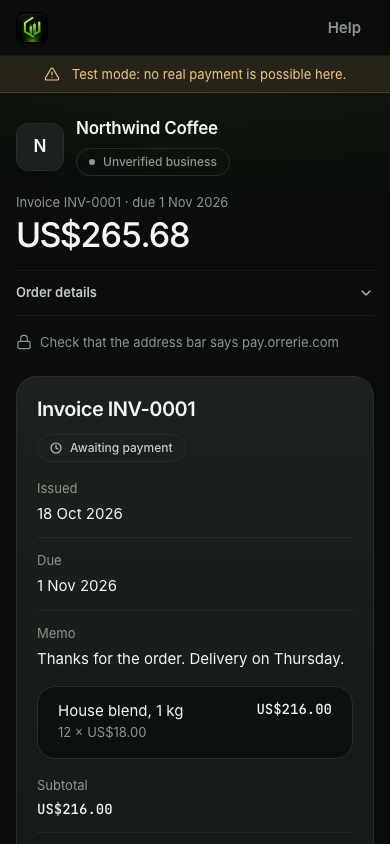
| State of the invoice | Words on its page |
|---|---|
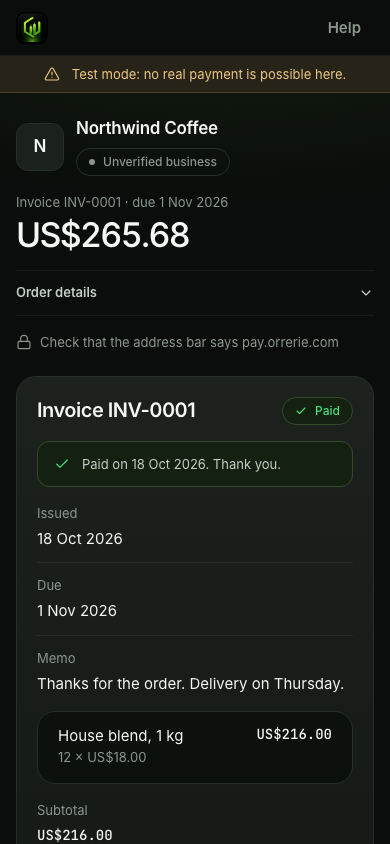
| Paid | "Paid on the date. Thank you." with View receipt |
| Part paid | The amount received and the amount still to pay, with Pay the rest |
| Overdue | "This invoice was due on the date." It can still be paid. |
| Void | "This invoice was cancelled by your business." |
| Paid outside Orrerie | "This invoice has been settled." |
Change, void or settle an invoice
- Edit. A draft can change in every way. On an
openinvoice the API lets you change onlydue_date,memo,footer,remindersandmetadata. Once a customer has payment details the amount is fixed: void the invoice and send a new one. - Void. Void an invoice cancels the invoice and its order. It is refused with
order_has_paymentif anything was paid, in which case refund it instead, and withinstruction_in_flightwhile a payment is on its way. - Mark as paid outside Orrerie. For an invoice paid by bank transfer or cash, an Owner or a Finance member marks it in the dashboard with a note and a date. Its order is cancelled so that nobody can pay it twice, and it is left out of your crypto totals.
- Delete. Only a draft can be deleted.
An address cannot be taken back
If you void an invoice after a customer was shown payment details, they can still send to that address. The money then arrives in your wallet as an unmatched payment, and you refund it. The dashboard says so before you confirm.
Follow an invoice from your server
| Event | When |
|---|---|
invoice. | A draft was made. |
invoice. | It became open and has its number and its order. |
invoice. | The email went out. Not sent in this release, because Orrerie emails no customer yet. |
invoice. | The due date passed unpaid. |
invoice. | Its order was paid. |
invoice. | It was voided. |
invoice.paid tells you about the invoice. To release goods or a service, act on order.paid for the invoice's order, which is the one fulfilment event for everything Orrerie sells.
Try it in test mode
With an sk_test_ key, create a customer with an email address of your own, then run the two calls above. Open the invoice's page and press Pay invoice. The checkout carries the test banner: press Pay in full in its "Test payment" panel, or simulate from your server with the invoice's order:
curl
curl https://api.orrerie.com/v1/test/orders/ord_0zymngngvf12b8b2cra7tb8e/simulate_payment \
  -H "Authorization: Bearer $ORRERIE_SECRET_KEY" \
  -H "Content-Type: application/json" \
  -d '{
  "scenario": "exact",
  "asset": "ethereum:usdc"
}'
JavaScript
const response = await fetch("https://api.orrerie.com/v1/test/orders/ord_0zymngngvf12b8b2cra7tb8e/simulate_payment", {
  method: "POST",
  headers: {
    Authorization: `Bearer ${process.env.ORRERIE_SECRET_KEY}`,
    "Content-Type": "application/json",
  },
  body: JSON.stringify({
    "scenario": "exact",
    "asset": "ethereum:usdc"
  }),
});
const result = await response.json();
if (!response.ok) throw new Error(`${result.error.code}: ${result.error.message}`);
console.log(result);
Python
import os
import requests

response = requests.post(
    "https://api.orrerie.com/v1/test/orders/ord_0zymngngvf12b8b2cra7tb8e/simulate_payment",
    headers={"Authorization": f"Bearer {os.environ['ORRERIE_SECRET_KEY']}"},
    json={
        "scenario": "exact",
        "asset": "ethereum:usdc",
    },
    timeout=30,
)
result = response.json()
if not response.ok:
    raise RuntimeError(f"{result['error']['code']}: {result['error']['message']}")
print(result)
PHP
<?php
$request = curl_init('https://api.orrerie.com/v1/test/orders/ord_0zymngngvf12b8b2cra7tb8e/simulate_payment');
curl_setopt_array($request, [
    CURLOPT_RETURNTRANSFER => true,
    CURLOPT_CUSTOMREQUEST => 'POST',
    CURLOPT_HTTPHEADER => [
        'Authorization: Bearer ' . getenv('ORRERIE_SECRET_KEY'),
        'Content-Type: application/json',
    ],
    CURLOPT_POSTFIELDS => json_encode([
        'scenario' => 'exact',
        'asset' => 'ethereum:usdc',
    ]),
]);
$body = curl_exec($request);
if ($body === false) {
    throw new RuntimeException(curl_error($request));
}
$result = json_decode($body, true);
if (curl_getinfo($request, CURLINFO_HTTP_CODE) >= 400) {
    throw new RuntimeException($result['error']['code'] . ': ' . $result['error']['message']);
}
print_r($result);
The invoice becomes paid and invoice.paid arrives with livemode: false.
The same in brief, without code: Crypto invoices with a PDF.